TripIt: Travel Planner
- 4.7
- Rating
- 5.00M
- Installs
- Free
- Price

 Analysis by App-foxy
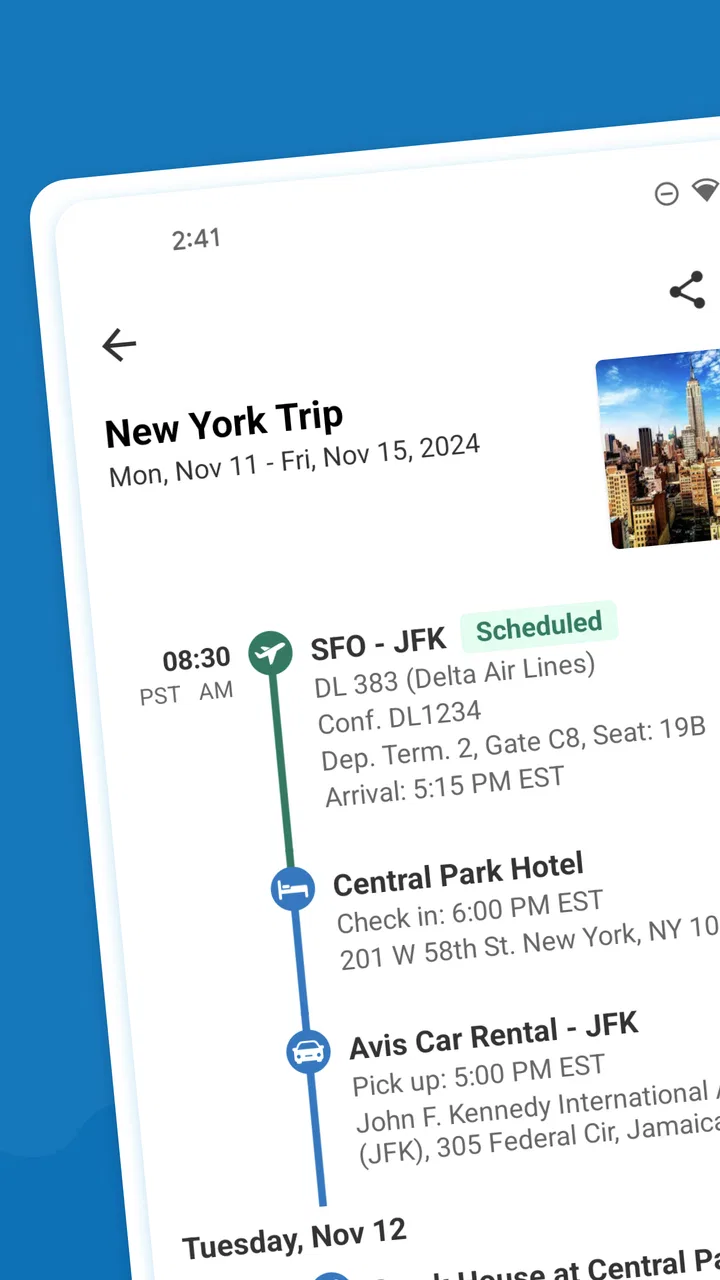
TripIt: Travel Planner is the kind of travel app I appreciate most when a trip starts becoming complicated. Instead of leaving confirmations scattered through email, messages, screenshots, and calendar entries, I use it as a central place for the plans I need to find while moving from one stage of a journey to the next. It is a free Travel & Local app from TripIt, Inc., and its main value is not flashy entertainment but reducing the mental effort of keeping travel details together.
After spending time with it, I see the app as particularly useful for people who take several flights, combine different types of transport, or organize travel for more than one person. It can also help anyone who finds travel information difficult to scan under pressure. At the same time, it is not a complete replacement for airline, rail, hotel, or navigation apps. Its strength is organization, while live operational decisions may still require the original provider’s app.
How clearly the trip information is organized
The first thing I notice is the difference between searching through an inbox and opening one itinerary. A travel confirmation may contain a lot of unrelated text, while an organized plan gives me a more direct view of what is happening and when. That matters when I am standing in a station, checking a hotel address, or trying to remember which reservation belongs to which day.
You May Also Like

 Blood Strike: 2.5 Anniversary
Blood Strike’s Loadouts Turn Every Drop Into a Tactical Gamble
A close look at Blood Strike’s custom loadouts: how fast access to signature weapons reshapes its battle royale rhythm, rewards preparation, and narrows the gap between fights.

 Pandora - Music & Podcasts
Pandora’s Music Is Easy to Start, but Harder to Recover
Pandora’s strength is its low-effort path from a seed to a station. Its weak spot is how much confidence it asks you to place in connection, setup, and quiet recovery.

 8 Ball Pool
 Is Built on Rivalries, Rematches, and Routine
A close look at the rivalries, rematches, shared routines, and unanswered safety questions that turn a quick pool match into a persistent mobile community.

 Samsung Music
’s Quiet Strength Is Playing What You Already Own
Its reach comes less from spectacle than from dependable access to a personal library. That simplicity is both the app’s strongest retention engine and its ceiling.

 AccuWeather: Weather Radar
AccuWeather Review: A Quick, Clear Forecast for Everyday Decisions
For everyday plans, the best forecast is the one you can understand quickly. AccuWeather makes rain timing, radar, and local conditions easy to act on, with a few trade-offs.

 Hill Climb Racing
Why Hill Climb Racing Still Turns Crashes Into One More Run
A tiny car, a bumpy hill and one more upgrade: Hill Climb Racing keeps resurfacing because its simple chaos makes every near-miss feel personal.
More From Our News Desk



The layout is most helpful when I treat each journey as a sequence rather than a pile of documents. Flights, accommodation, transport, and other reservations make more sense when viewed in the order they happen. I do not have to mentally rebuild the trip every time I need a detail. For travelers who prefer a clear timeline, this is a more comfortable approach than relying on a general notes app.
Readability also depends on how carefully I prepare the itinerary. If I forward confirmations with incomplete or unusual information, I still need to review the result instead of assuming every detail has been interpreted perfectly. My practical advice is to check the finished plan before departure, especially for multi-city travel. A few minutes of checking can prevent confusion later.
The biggest accessibility benefit is reduced information hunting. Someone who finds dense emails tiring, has difficulty remembering sequences, or becomes overwhelmed by a busy travel day may find a single itinerary easier to use than several unrelated services. This is not the same as guaranteeing accessibility for every person, but it is a meaningful design advantage in everyday travel.
Navigation that supports different planning styles
I can use the app as a quick reference during a trip, but it is also useful before leaving home. A person who likes to plan every transfer can inspect the itinerary in advance, while someone who prefers a lighter approach can use it mainly as a backup for addresses, booking details, and timing. That flexibility makes it less demanding than a planning tool that expects me to build every part of a journey manually.
There is a useful distinction between organizing and acting. The itinerary helps me understand what I booked, but it does not remove the need to read signs, follow local instructions, or confirm changes with a provider. I would not rely on it alone for a last-minute platform change or a cancellation. For those events, the carrier’s own communication channel remains more authoritative.
People who use larger text, screen magnification, or other device-level display adjustments may find a structured itinerary easier to inspect than a long email thread. However, the experience can still vary depending on the phone, operating system settings, and the complexity of the booking. I would test a real reservation before depending on it for a trip where quick reading is essential.
Useful workflows beyond simply storing confirmations
One practical workflow is to use the app as a shared memory for a group trip. Rather than asking one person to resend the hotel name or arrival details repeatedly, the itinerary can become the reference point for everyone involved. This is especially useful when one traveler handles bookings and another traveler needs to understand the schedule without searching through the organizer’s inbox.
Another helpful habit is separating preparation from travel-day use. Before departure, I review the order of reservations and look for awkward gaps or duplicated entries. During the journey, I use the itinerary for quick recall rather than trying to reconstruct the entire plan. That small change makes the app feel less like another task and more like a dependable travel notebook.
A third insight is that centralization can help people with different memory and attention needs, but only if the itinerary is maintained. If a booking changes, I do not assume an old entry is automatically enough for a decision that affects the next hour. I check the relevant provider as well. The app reduces clutter; it does not eliminate the responsibility to verify important changes.
Accessibility in real travel situations
I find accessibility in a travel organizer is less about adding another feature and more about making the next useful detail easier to reach when the surroundings are demanding. Before a journey, I would check that the itinerary is comfortable to read on my own device and decide which provider apps I still need for urgent actions. That small preparation helps clarify where a consolidated plan supports me—and where I should use another channel.
Motor considerations when time and movement are limited
Travel often means using a phone while carrying luggage, wearing gloves, standing in a queue, or moving through an unfamiliar building. In those situations, fewer searches and fewer app switches are valuable. Having the plan in one place can reduce repeated typing, which is helpful for anyone with limited hand movement, fatigue, or difficulty performing precise actions quickly.
Still, a travel organizer cannot solve every motor challenge. I may need to interact with a separate airline or hotel service for check-in, changes, or special requests. I may also need to copy information into another app. For someone who needs a fully simplified travel workflow with minimal switching, that boundary is important. TripIt helps with retrieval, but it is not the entire journey.
I also recommend preparing the itinerary before reaching the airport or station. Entering information while balancing bags is a poor time to discover that a reservation needs correcting. A prepared plan gives me something easier to consult when my attention and physical freedom are limited.
Sensory load, readability, and cognitive comfort
Airports and stations are already full of announcements, signs, crowds, and changing instructions. A quiet, organized reference on my phone can reduce one source of sensory and cognitive load. I can look for the next relevant reservation instead of opening several messages and filtering out unrelated content.
This is particularly useful for travelers who struggle with working memory or who need extra time to process information. A chronological plan gives context: where I am in the journey, what comes next, and which reservation I should be checking. It does not replace human assistance or clear signage, but it can make the personal information side of travel less chaotic.
There are limits. A long or complicated itinerary can still feel demanding, especially when it contains many reservations. I would avoid treating the app as a reason to over-plan every minute. For someone sensitive to information overload, a carefully edited trip with only the details that matter may be easier to use than an exhaustive record.
People with hearing-related access needs may appreciate having written travel information available instead of depending entirely on announcements. However, written itinerary details are not a substitute for live alerts or staff instructions. If a platform, gate, or service changes, I still need to watch the provider’s updates and the surrounding signs.
When connectivity, stress, or unfamiliar surroundings change the experience
Travel is not always calm or connected. I might be in a crowded terminal, using a weak data connection, or trying to find an address immediately after arrival. That is why I would prepare the app before leaving and keep essential details available in a form I can reach quickly. The more dependent I am on immediate access, the less sensible it is to wait until the travel day to organize everything.
A realistic example is a family arriving in a new city after a long flight. One adult may be handling luggage, another may be helping a child, and nobody wants to search separate inboxes for the accommodation address. A consolidated itinerary can make that handoff simpler. The person holding the phone does not need to remember every booking, and another family member can focus on the next practical step.
For a business traveler moving between meetings, the benefit is different. The app can act as a travel spine around which the day is arranged, while work appointments remain in the appropriate calendar or communication tool. I like this separation because it avoids forcing one app to become a full personal assistant. Trip details stay together without pretending to manage every part of the schedule.
Where the experience still creates barriers
The first barrier is dependence on correctly captured information. Travel confirmations are not always written in a consistent format, and an itinerary deserves a human check. This is a small burden for a straightforward flight and hotel, but it becomes more important when reservations are unusual, split across travelers, or changed after booking.
The second barrier is the difference between a plan and live service control. If I need to change a seat, request assistance, complete an airline process, or resolve a booking problem, I may have to move to the provider. That can be difficult for users who need a single, low-friction interface. TripIt organizes the information, but it does not make every travel service equally accessible.
The third barrier is attention. A tool designed to reduce clutter can still become another place to monitor if I expect it to answer every question. I get the best results when I decide what role it plays: itinerary reference, not universal alert system, navigation replacement, or customer-service desk.
Privacy and sharing also deserve personal judgment. A complete itinerary contains sensitive travel context, so I would share it only with people who genuinely need it and avoid treating a group itinerary as public information. The convenience of giving relatives or companions one reference point should be balanced with sensible control over who can see travel plans.
Who should use it, and who may prefer an alternative
I would recommend it to frequent travelers, families coordinating several bookings, assistants arranging trips, and anyone who dislikes searching through confirmation emails. It is also a good fit for people who benefit from a visible sequence of events rather than a collection of separate documents. Its free price makes it easy to try without committing to a paid planning system, although in-app purchases are listed at up to $48.99 per item, so I would review the purchase screen carefully if I decide to explore paid options.
I would be more cautious about recommending it to someone who takes only one simple trip and already feels comfortable with a calendar and a small folder of confirmations. For that person, adding another app may create little benefit. I would also suggest a provider’s own app as the primary tool for travelers who mainly need live flight management, boarding functions, or direct support from one airline.
Compared with a notes app, TripIt offers a travel-focused structure instead of asking me to design my own headings and order. Compared with a calendar, it keeps reservations connected as one journey rather than scattering them among ordinary appointments. Compared with booking-provider apps, it is broader across a trip but usually less specialized for the operational details of one service. That trade-off explains its appeal and its limits.
What the current app represents
The current version is 15.3.0, and the app supports devices running operating system version 10 or later. It is rated for Everyone, which fits its role as a general travel organizer rather than a niche tool for a particular age group. I would still judge the practical experience on the specific phone and with the person’s own display, input, and reading preferences rather than treating an age label as an accessibility guarantee.
Its popularity also suggests that the basic idea solves a familiar problem: the app has passed five million installs, with a 4.7 average from around 93 thousand ratings and around 15 thousand written reviews. Those figures do not tell me whether it will suit a traveler with a particular access need, but they do indicate that the central itinerary concept is widely used and easy for many people to understand.
My inclusive verdict
My final view is that TripIt: Travel Planner is most valuable as a calm, structured layer between messy booking messages and the reality of a busy journey. I like it because it reduces the number of places I need to search, makes the order of a trip easier to understand, and can support companions who need the same information without sharing one person’s inbox.
Its inclusive value comes from organization rather than from promising that every travel task will be accessible in one place. It can help with memory, attention, reading under pressure, and written access to plans, while still leaving live changes and service-specific actions to airlines, hotels, rail operators, or other providers. That distinction matters for anyone making a careful accessibility decision.
If I were recommending it to a friend, I would say: use it before the trip, review the itinerary yourself, keep provider apps available for urgent changes, and share the plan thoughtfully. With those habits, the free app from TripIt, Inc. becomes a practical travel companion. If your priority is controlling one specific booking or avoiding any extra planning layer, the usual provider app or a simple calendar may suit you better.
FAQs for TripIt: Travel Planner
01What is TripIt: Travel Planner and how does it work?
TripIt: Travel Planner is a comprehensive travel management app designed to organize all your travel plans in one place. Once you forward your travel confirmation emails, such as flights, hotels, and car rentals, TripIt automatically creates a detailed itinerary for you. This allows users to access their travel plans easily, even offline.
02Is TripIt: Travel Planner available for both Android and iOS devices?
Yes, TripIt: Travel Planner is available for download on both Android and iOS platforms. The app offers a seamless user experience across devices, ensuring that your travel itineraries are synchronized and accessible from smartphones, tablets, and even on the web.
03Does TripIt: Travel Planner require a subscription, or is it free to use?
The basic version of TripIt is free and includes essential features like itinerary creation and sharing. However, for advanced features such as real-time flight alerts, seat tracking, and other premium services, users can opt for TripIt Pro, which requires a subscription fee.
04How secure is my travel information with TripIt: Travel Planner?
TripIt prioritizes the security and privacy of its users' data. The app employs bank-grade encryption to protect your travel information. Moreover, TripIt is compliant with data privacy regulations, ensuring that your personal data is handled with the utmost care and confidentiality.
05Can TripIt: Travel Planner integrate with other apps or calendars?
Yes, TripIt can integrate with various apps and calendars. It allows you to sync your travel itineraries with your Google Calendar, Outlook, or Apple Calendar, ensuring all your travel plans are aligned with your schedule. Additionally, TripIt supports connections with other travel apps to enhance your travel management experience.
Pros
- Intuitive interface for easy navigation.
- Syncs seamlessly with calendars.
- Real-time flight alerts available.
- Stores all travel documents securely.
- Works offline after initial setup.
Cons
- Limited features in the free version.
- Some integrations can be glitchy.
- High battery consumption reported.
- Occasional sync delays with updates.
- Privacy concerns with data sharing.

TripIt: Travel Planner
Gallery